WP Premium: Mortar from Woothemes  

Posted by Samson Delila in , ,


A hugely flexible theme built on a neat JQuery layout plugin that arranges your posts vertically than horizontally with complete control over the number of columns on the home and archive page. Ideal for magazine, portfolio and gallery based websites.

Release date: August 6, 2009
Designer: Mark Forrester
Developer : woothemes
Theme Type: Magazine / News, Multimedia, Portfolio

Unique Features
These are some of the more unique features that you will find within the theme:

  • Built on the popular JQuery layout plugin Masonry (Source code here), the home page arranges blog posts vertically then horizontally to make sure there is a neat grid of posts with no spacious gaps between them.
  • The home page and archive page also have the option to arrange the posts in 1, 2, 3, or 4 columns giving you complete flexibility with your layout.
  • A completely widgetized sidebar with 2 custom widgets included in the theme packaging. No third party widgets required; and
  • 8 amazing colour schemes to choose from!

Standard Features
These features are probably just as special as the one’s above, but you’ll find these standard features within most of our wide range of themes:
  • Integrated Theme Options (for WordPress) to tweak the layout, colour scheme etc. for the theme;
  • Threaded Comments for WordPress 2.7+;
  • Custom Page Templates for Archives & Sitemap;
  • Built-in Gravatar Support for Comments; and
  • Integrated top banner ad space, which can accommodate both image banner ads or AdSense embeds.
You can view demo of this theme at Here and download it at Here.

WP Premium - StudioBlue Version 2  

Posted by Samson Delila in , ,


Features of this theme:

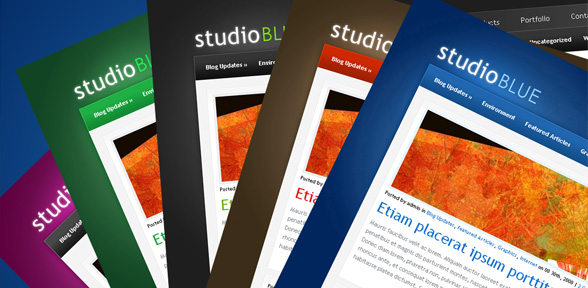
1. Blog Color-Scheme-Switcher
From within the theme’s options menu you can now choose between 5 unique color schemes. This is handled through a simple dropdown menu, and you can switch between each color any time you want.

2. Optional Blog-style Post Style
If you don’t like the CMS style font-page, or feel that it simply doesn’t suite your blog’s content/subject matter, you can simply switch to “Blog Style.” This is also done through a simple dropdown menu, and you can change back and forth any time you like.


3. Enhanced Advertisement Management
I have added several new banner options, each of which is handled via the theme’s options menu. Furthermore, each of these banners is optional! You can turn them on and off from the options menu, and you are free to have any combination of banners that you like. The available banner options are:

  • 4 125×125px Banners in the Sidebar
  • 1 250×250 Banner in the Sidebar
  • 1 468×60 Banner on Post Pages
  • 1 728×90 Leaderboard Above the Content

4. Optional Categories Dropdown Menu
I have added a dropdown menu function to the categories navigation bar. This is also optional, and can be turned on and off from within the theme’s options menu.


5. Additional Homepage Settings
You can now choose to enable/disable the various elements on the homepage, including the featured articles section, the categories boxes towards the bottom, and the popular/random articles lists. You can also choose how many featured articles to display, how many recent posts to display, and how many recent posts to display in the category boxes (which are also a new feature themselves).


6. Additional Post-Page Settings
You can now turn off the thumbnails on post pages. In some case the thumbnail acted as preview for an image that was already included in the post, in this case you might not want a thumbnail on the post-page at all. You can also choose to enable/disable the tabbed menu below the post. I have also added to ability to change the comments style from the “graphical” style that is currently active, to a more minimal style without images or gravatars. (I removed the gravatar plugin and am using wordpress’ native gravatar function now)


7. Improved Options Interface
Aside from that I have simply tried to improve the look of the options page itself. It was getting quite cluttered before, and now has a much more organized interface:


There are other options available as well, you’l just have to update and play with them yourself. This is the type of functionality that you can soon expect from all of my themes, especiall all new theme releases. I hope everyone is doing well, stay tuned for more updates!

You can get this theme by downloading at Here.